
Math Practice - MathFun!1.29 - Google Play
You'll be able to see results in few seconds.
Publisher Description
★ Math Fun! Pro ★
A fun game to practice basic math facts.
. Featured in Android Market's staff's pick
Help your child be familiar with basic concepts through daily practice.
★ Pro version
Due to Android market policy, you will have only 15-minutes refund window. Please check with Demo version before purchase. For demo, please search "mathfun"
★ Key features
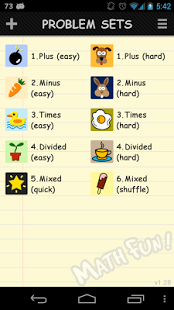
Create your own problem set or use preloaded sets
• addition, Subtraction, Multiplication, Division.
• three difficulty levels for each operation.
• scribble on the screen for complicated calculation
• quick mode and shuffle
• horizon and vertical problem display
Keep time an score
• record time and score for each practice run.
• revisit wrong answers
More fun with screen customization
• screen backgrounds
• problem set icons
• correct/wrong sounds
★ Keywords
Kids, Educational, Child, Children, Cognitive Skills, Numbers, Add, Subtract, Compare, Facts, Math, Math Practice, flashcards, math flash cards, Addition, Subtraction, Multiplication, Division, math problems, math quiz, learn math, educational, flash cards, math game, educational math, learning math, educational games, math games, teaching math game
About Math Practice - MathFun!
The company that develops Math Practice - MathFun! is m-Surf Lab.. The latest version released by its developer is 1.29.
To install Math Practice - MathFun! on your Android device, just click the green Continue To App button above to start the installation process. The app is listed on our website since 2014-03-11 and was downloaded 0 times. We have already checked if the download link is safe, however for your own protection we recommend that you scan the downloaded app with your antivirus. Your antivirus may detect the Math Practice - MathFun! as malware as malware if the download link to com.acj0.mathfunfactspro is broken.
How to install Math Practice - MathFun! on your Android device:
- Click on the Continue To App button on our website. This will redirect you to Google Play.
- Once the Math Practice - MathFun! is shown in the Google Play listing of your Android device, you can start its download and installation. Tap on the Install button located below the search bar and to the right of the app icon.
- A pop-up window with the permissions required by Math Practice - MathFun! will be shown. Click on Accept to continue the process.
- Math Practice - MathFun! will be downloaded onto your device, displaying a progress. Once the download completes, the installation will start and you'll get a notification after the installation is finished.
Program Details
System requirements
Download information
Pricing
Version History
version 1.29
posted on 2014-03-11
★ If you see any problem, please send us email instead of writing in review. We want our users happy and will gladly assist you ★,v1.28~29,. Revised some screen icons and designs for large screen devices,v1.27,. Fixed Force close for the problem with three digit numbers,v1.25-26,. Added feature to modify/add problem types (number range, title...),. Revised some icons,v1.24,. Added back button on action bar,. Bug fixes for jelly bean,. Fixed screen layout problem in Tablet
version 1.14
posted on 2011-05-21
Several fixes and updates
Disclaimer
Official Google Play Link
We do not host Math Practice - MathFun! on our servers. We did not scan it for viruses, adware, spyware or other type of malware. This app is hosted by Google and passed their terms and conditions to be listed there. We recommend caution when installing it.
The Google Play link for Math Practice - MathFun! is provided to you by apps112.com without any warranties, representations or guarantees of any kind, so access it at your own risk.
If you have questions regarding this particular app contact the publisher directly. For questions about the functionalities of apps112.com contact us.
